
The right color correction can make or break your film in many ways. The process of color correction has always been a tedious and labor intensive task, however, with the use of LUTs you can drastically reduce the time needed to color your next project and make it look phenomenal. I have come across multiple sites, articles and videos online that make LUTs seem complicated....they are not! You just need to know a few of the basics to use them properly.
Okay...but what exactly is a LUT?
LUT stands for Look Up Table. In short, LUT is a table used to map one color space to another. For example, a LUT can remap a log image into Rec.709 space or it can be used to apply a preset look for any given image or footage. WHOAH!!! What? Don't worry, its not as complicated as it sounds and there are terms like Rec.709, color space and these tables that make it more confusing sounding overall.....simply put;
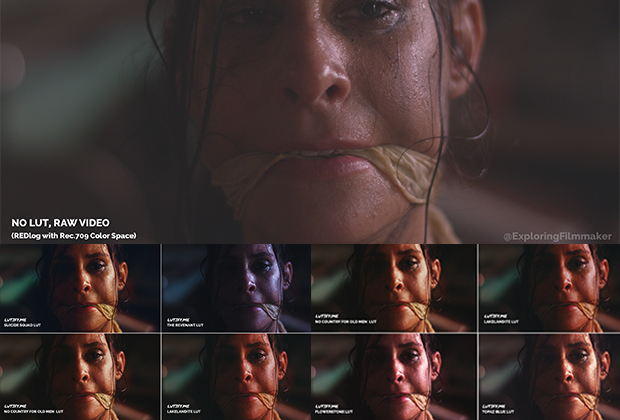
A LUT allows you to apply different Pre-Made color styles to your projects. Want it to look like "The Matrix" with a cinematic green hue.....or how about like "Suicide Squad" with a green and orange base? Applying the right LUT to your footage will give you a great look without having to go through all the "color mixing" and complicated processes to achieve this yourself. Think of a LUT as a starting template for your film's color theme....a great point to start your final color correction process taking many steps out of the process.
So I can shoot anything and apply a LUT and have a great looking image?
Ha....no. Even though LUTs will help your footage look great quickly...you need to know a few basic things first. LUTs are not magic tools that will take something shot poorly and turn it into a cinematic masterpiece. Its your job as the filmmaker to ensure you do a few things correctly just as you would before handing it over to a color correction lab;
- Shoot in RAW, LOG (SLOG3, SLOG2) or in REC.709 format. LUTs work best when they can utilize all the range from these types of files. When blacks are crushed and clip data is compressed it's always tougher to color correct and grade.
- Light your scenes and subjects correctly. Use your histogram, scopes and false color to ensure the best exposure data possible....this will help by giving you more correctable range.
- Use LUTs to monitor your shots. Most modern cameras and monitors (such as the Atomos Shogun) allow you to pre-load LUTs for monitoring. This will give you a good idea on set if you need to adjust your lighting to get that grade your looking for in the end.
- If you don't have a camera capable of shooting RAW/LOG, make sure to shoot in a FLAT color profile. Run tests! Never try something new on an important shoot, go out and do some tests beforehand.
The one thing that I discovered years ago as a new filmmaker was this:
So I shot in SLOG2/3 or on a Cinema Camera in RAW, what next?
What LUT Package Should I Get?
- They are very affordable and they keep adding new stuff all the time.
- I'm a fan of their "Movie Inspired LUTs". These range from "The Revenant, Suicide Squad to No Country for Old Men" in style, love those!
- They include conversion LUTs as well as a collection of Film Grain
- It's a large collection with many styles; Cine Looks, Alternative Process, Teal & Orange, Skin Tone and many others.
Save 10% when you order your LUT package from Lutify.me by using the following link and promo code at checkout;
Check out Lutify.me's LUTs here
Enter 10% Off Promo Code: JAMESCAWLEY
Click here to view the finished video in the screen shots and learn how we made it for $0